Description
Abstract: Stepper Motor Control Using Raspberry Pi with ULN2003 and 28BYJ-48 Stepper Motor
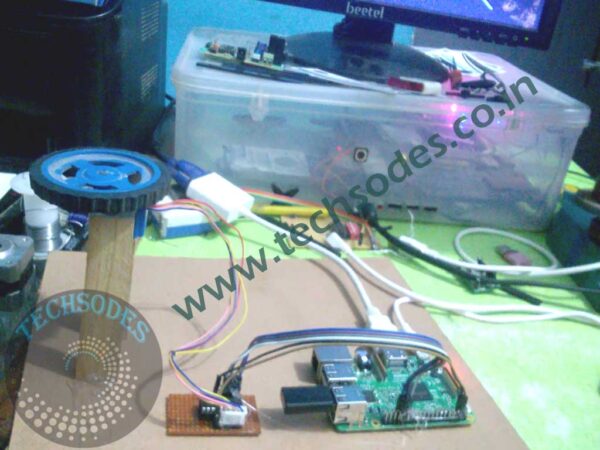
The integration of hardware and software to control electromechanical devices has become an essential aspect of embedded systems and automation. Among these devices, stepper motors are widely used in applications requiring precise position control, such as robotics, CNC machines, 3D printers, and camera positioning systems. This project, ?Stepper Motor Control Using Raspberry Pi,? demonstrates the effective control of a 28BYJ-48 5V stepper motor through the ULN2003 motor driver module using a Raspberry Pi single-board computer. The system is designed to allow the user to control the motor’s direction, speed, and motion via keyboard inputs ? making it simple and interactive.
Overview and Objective
The primary objective of this project is to explore the ability of the Raspberry Pi to control a stepper motor, implementing motion control operations such as forward, reverse, stop, speed up, and slow down. This is done without the use of any IR receiver or external sensors. Instead, keyboard keys are mapped to specific motor actions, where:
- Pressing ?F? makes the motor rotate in the forward direction
- Pressing ?B? rotates it backward
- ?S? stops the motor
- ?+? increases the motor speed
- ?-? decreases the speed
This form of interaction makes the system ideal for beginner-friendly robotics and automation applications while showcasing GPIO control through Python programming on the Raspberry Pi.
Hardware Used
- Raspberry Pi (any version) ? Acts as the central controller.
- ULN2003 Driver Board ? An easy-to-use motor driver for low-power stepper motors.
- 28BYJ-48 Stepper Motor (5V) ? A widely used, inexpensive stepper motor with 64 steps/rev and a gear ratio of 1:64, offering fine angular resolution.
- Jumper Wires ? For GPIO connections.
- Keyboard ? Standard USB or wireless keyboard used to give control commands to the Raspberry Pi.
System Description
The 28BYJ-48 is a unipolar stepper motor, and it requires a sequence of electrical pulses to operate correctly. It consists of four coils which must be energized in a specific sequence to produce rotational movement. The ULN2003 driver board is connected to the Raspberry Pi via four GPIO pins, which control the four input lines of the driver. The output of the ULN2003 is connected to the four coil inputs of the stepper motor.
The Raspberry Pi provides the logic-level signals needed to drive the ULN2003 inputs. These logic signals are generated using a Python script that reads keyboard input in real-time using the keyboard or curses module. Based on the key pressed, the motor rotation direction and speed are adjusted dynamically.
Working Principle
The working principle involves:
- GPIO Control: The Raspberry Pi?s GPIO pins send HIGH/LOW signals to the ULN2003 based on the current step of the sequence.
- Step Sequence: The stepper motor requires either a full-step, half-step, or wave-drive sequence to rotate. This project uses half-step driving, which balances speed and smoothness.
- Timing Control: The time delay between each step determines the motor?s speed. A smaller delay results in faster rotation, and vice versa.
- Direction Control: Reversing the step sequence leads to backward rotation.
- Keyboard Events: The Python program maps specific keys to speed and direction logic, allowing interactive control.
Software Implementation
The program is written in Python, using libraries such as:
RPi.GPIO? To control the GPIO pins.time? For step delay control.keyboardorcurses? For capturing key presses in real-time without the need for pressing Enter.
Key features of the code include:
- An infinite loop that runs until the user exits.
- Speed control by changing the
time.sleep()delay. - Event-based logic to rotate the motor forward or backward.
- Proper GPIO cleanup to avoid port conflicts.
Advantages of This Project
- Low Cost: Uses inexpensive and easily available components.
- Simple Interface: No need for external remotes or IR modules. The keyboard is enough.
- Educational: Provides an excellent foundation for learning GPIO control, stepper motor theory, and Python programming.
- Expandable: The project can be extended to include sensors, GUI controls, or remote access.
Applications
The knowledge and implementation demonstrated in this project can be used in various real-world applications such as:
- Camera gimbals or positioning systems
- Robotic arms and grippers
- Conveyor belt controls
- Home automation systems
- Rotating platforms or display stands
Challenges Faced and Solutions
- GPIO conflicts: Ensured proper cleanup after every run using
GPIO.cleanup(). - Real-time keyboard handling: Solved by using the
keyboardlibrary (note: requires root privileges). - Power limitations: Used an external 5V supply if required for the motor to avoid power drain on the Raspberry Pi.
Future Enhancements
While this is a standalone control system, future versions can include:
- Web-based control using Flask or Django on Raspberry Pi.
- Bluetooth or Mobile App control.
- Sensor feedback for closed-loop control.
- LCD Display for speed/direction display.
- Integration with ROS (Robot Operating System) for advanced robotics.
Conclusion
This project showcases a fundamental yet powerful method of controlling a stepper motor using the Raspberry Pi. It demonstrates GPIO-based control logic and basic keyboard interfacing in a Python environment, highlighting the motor’s motion control capabilities. The interactive nature of keyboard commands for motor control helps in understanding how step sequences, direction, and speed work together in real-time applications. With further enhancements, this prototype can be used as a base for a wide variety of robotic and industrial control systems.